Stays on the phone
The file never leaves this device. There is no server encode, so there is no per-minute cost.
SplitVideo
splitvideo.in
The file never leaves this device. There is no server encode, so there is no per-minute cost.
Original picture is copied. Cuts follow keyframes, so the start can land up to about a second early.
Uses the Files / Photos picker. Save with the system share sheet. Works in Safari and Chrome.
Proven on real recordings
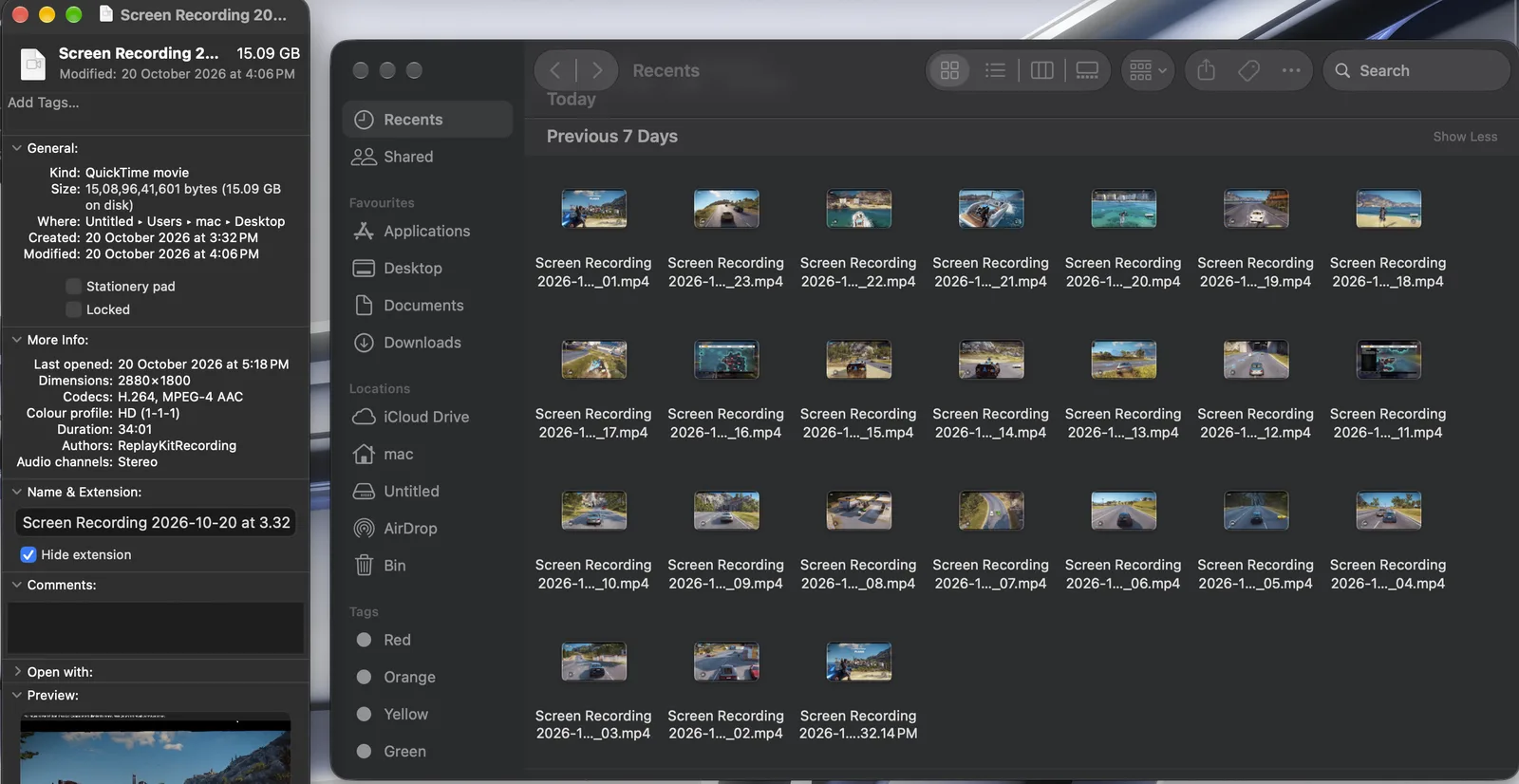
SplitVideo was built for exactly this job, and its creator uses it on his own gameplay recordings: one 15.09 GB session (34 minutes, 2880×1800), split into 24 equal parts of about 85 seconds — fast, with nothing uploaded. The default mode copies the original video stream instead of re-encoding it, so every part keeps the source quality and exports finish quickly. One run creates up to 24 clips; for an even longer session, split it in two ranges.
Read the full case study — specs, screenshots, and the big-file playbook →
Free online video splitter
SplitVideo is a free browser-based video splitter for turning one long recording into smaller, useful clips. Choose a range, divide the video into equal parts, create clips at a fixed interval, or add your own cut points. Everything runs in your browser — the original video is not uploaded to any server.
Useful when a long gameplay or recording needs a predictable number of pieces. Select Equal parts, choose the number of parts, and export the resulting clips.
Learn more about equal parts →Use Every N sec to turn a longer video into repeated time-based clips, or use Range when you only need one section of a recording.
Learn more about time splits →For interviews, gameplay highlights, tutorials, and other recordings, place cut points on the timeline and export separate pieces from them.
SplitVideo works in modern mobile and desktop browsers. On supported devices, the system share sheet can be used to save or share exported clips.
Why SplitVideo exists
SplitVideo.in started from a simple frustration common among gaming YouTubers and content creators: long gameplay recordings that needed to be broken into equal-length clips for Shorts, Reels, TikTok, or multi-part uploads. Most online tools required uploading the full file, waited on a server queue, or added watermarks. Offline editors were heavy or complicated for a quick split.
The goal was a tool that stays on the device, keeps the original quality by default, works in the phone browser, and makes equal-part and time-based splitting straightforward. That is what SplitVideo delivers — a free, private, browser-based video splitter focused on practical creator workflows.
Common use cases
Break longer recordings into shorter sections before editing or publishing them to Shorts, Reels, TikTok, or other platforms.
Turn a long gameplay session, screen recording, or event recording into manageable equal clips without first uploading the source file.
Create smaller pieces from a large recording when a single file is inconvenient to send or store.
Privacy by design
SplitVideo is designed around local browser processing. The tool reads the selected video on your device and creates the exported clips locally. There is no need to upload the original recording to a video-processing server. This is useful for personal recordings, private footage, gaming sessions, and large files where uploading first would be slow or undesirable.
Supported formats include common containers such as MP4, MOV, and other video types your browser can read. Processing limits depend on your device memory; very large files may work better when split into shorter ranges first.
Frequently asked questions
No. The splitter processes the selected file on your device in the browser. Nothing is sent to a remote server for encoding.
Yes. Choose Equal parts and set how many clips you want to create. Each part receives a similar share of the total duration.
Yes. Every N sec creates time-based clips of the length you choose from the selected video.
Yes — Safari on iPhone, Chrome on Android. Pick a video from Photos or Files, split it, and save the clips with the share sheet. The phone guide covers each platform's specifics.
More detailed answers: Video splitter FAQ
Explore